Beta 8: the interface finally looks like the idea — then the radio stack fought back
The Beta 8 overhaul is live — new home screen, arc dock, regrouped settings, and a rule that the phone may never force close. Plus the honest version of how I got VoLTE working on a generic system image, and the one thing I still won't claim.
Current builds as of today: PresenceOS Beta 8 v1.5.71 (build 126) and Guardian Relay v1.3.80 (build 90). This is the biggest visual change the project has had, and behind it is a week I mostly spent staring at telephony logs. Both halves are worth writing down.
The home screen is the product
For a long time PresenceOS looked like what it was: a very determined app doing an impression of an operating system. Beta 8 is the round where I stopped apologising for that and rebuilt the front of the phone properly.
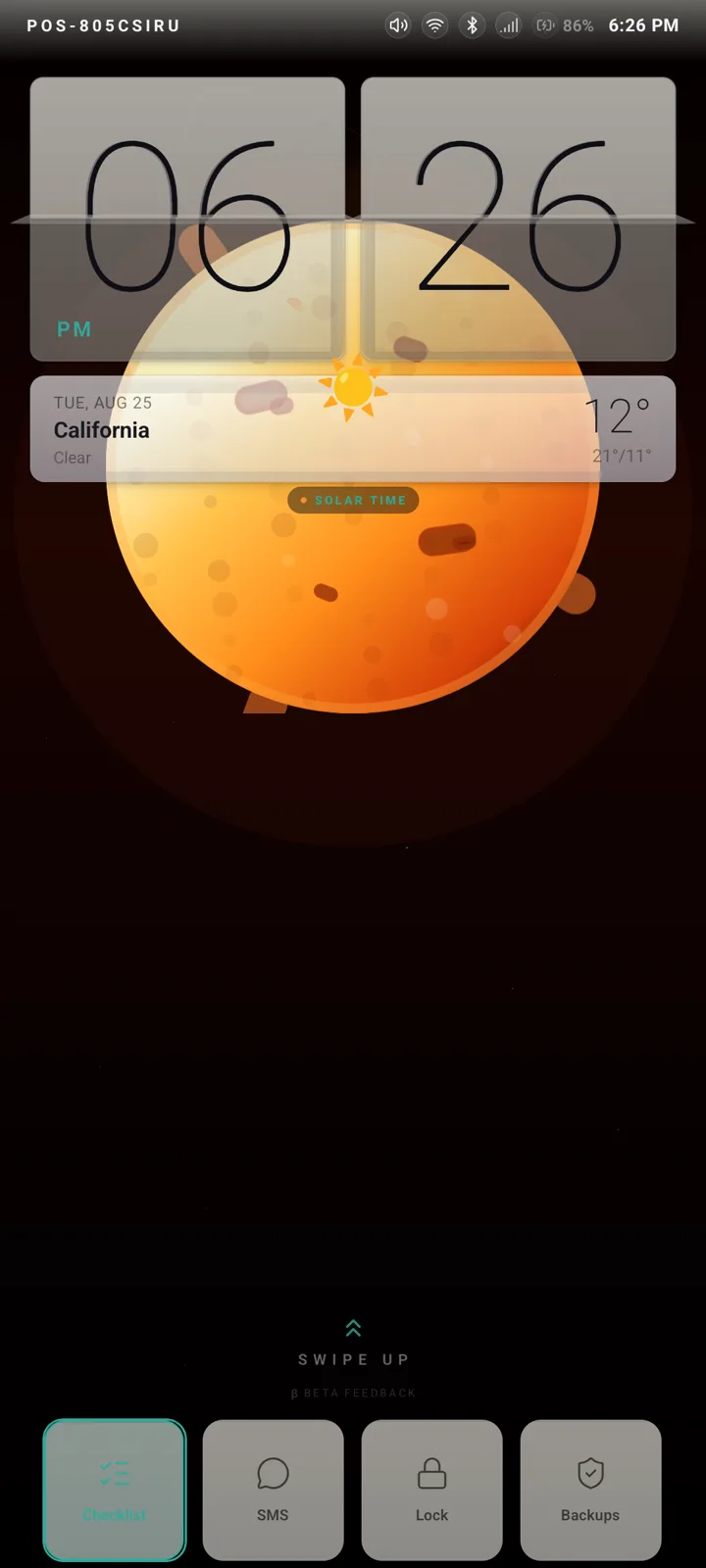
The default wallpaper is a white fantail on a branch — a New Zealand bird, shot properly, and the only decision in this whole release I made purely because it makes me happy every time the screen lights up. The clock flips. The weather card sits under it. The quick toggles live along the bottom where a thumb already is. The accent colour — lime out of the box — runs through the entire interface rather than through the three screens that remembered to ask, and the palettes underneath it were rebuilt from the mockups rather than nudged: a near-black deep-space green, a violet nebula, a retuned indigo midnight, and the rest of the fourteen.
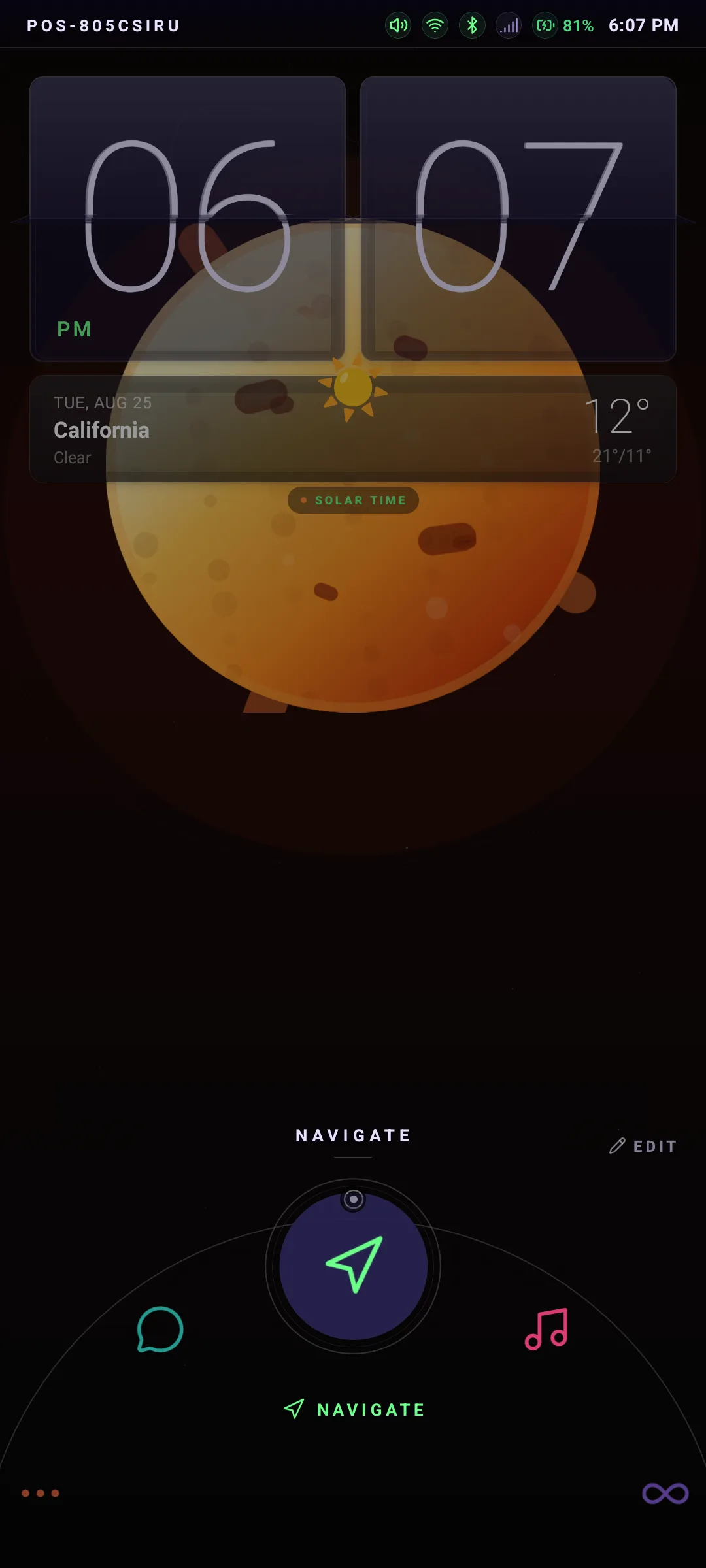
The dock is an arc rising out of the bottom edge. You drag it around, the label under your finger changes, you let go and you’re there. Long-press it and you’re in the editor: add, remove, reorder, swap what’s on each ring. That editor mattered more than the arc did — it’s the difference between my layout and your layout. And when music is playing, the album art fills the arc behind the icons, dimmed and held still, because a photograph spinning under your thumb is a nice demo and a bad phone.
The one thing I got wrong here is worth admitting: the restyle quietly dropped the quick toggles off the home screen, and I didn’t notice until I used the phone as a phone. They’re back, on the bottom edge, wired to the real device state rather than to a pretty switch that lies.
Settings that admit what they are
The old settings screen was one long column that had grown by accretion: every feature I shipped added another row to the bottom of it, and nothing ever moved. That’s how a settings screen ends up with the harmless things and the irreversible things sharing a scroll.
Now it’s grouped into labelled cards, and the grouping is opinionated: everything about getting the phone onto a network is one card and one screen; everything about locking the phone down is another; the deep system stuff — including Factory Reset, which is now buried inside About System where you have to mean it — is at the bottom.
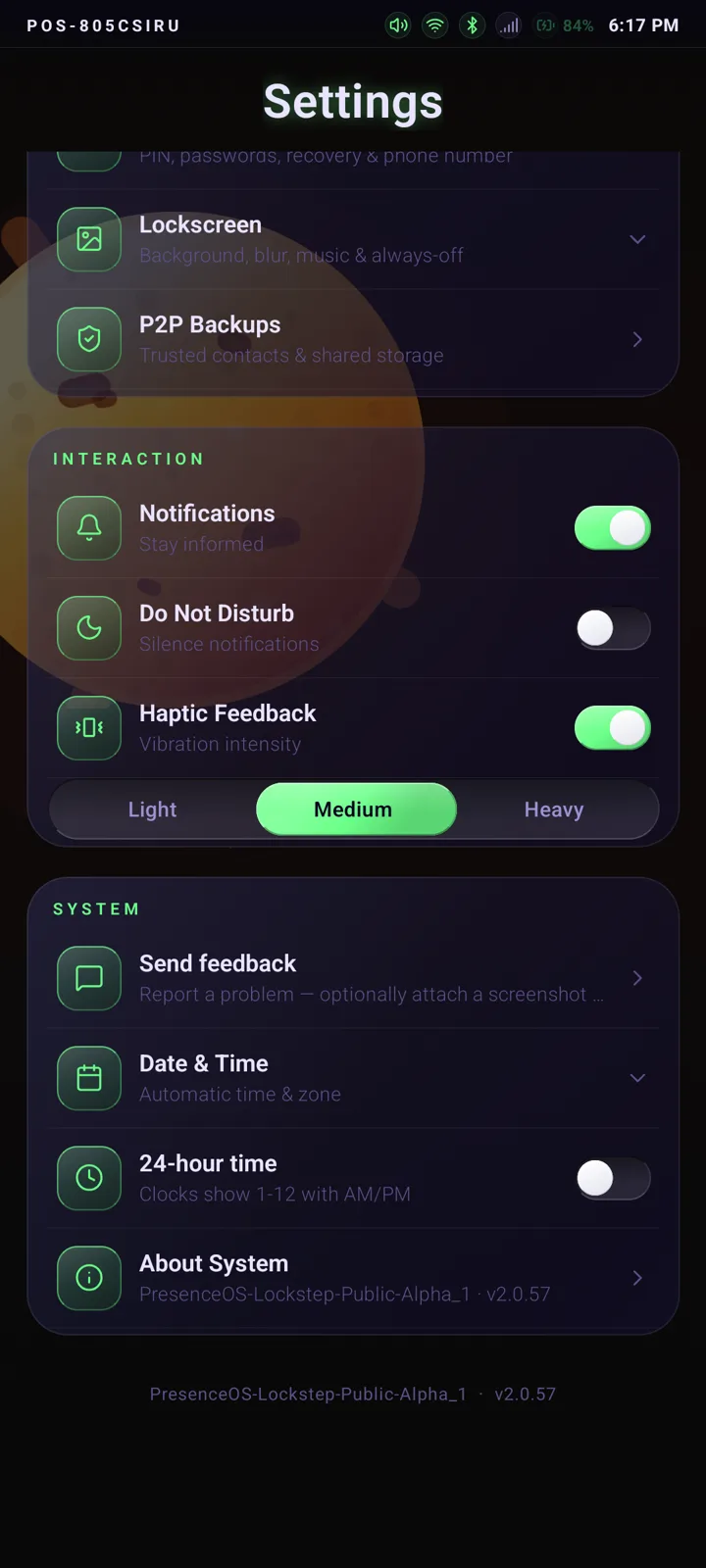
Three smaller things landed with it. The whole interface is slightly larger by default, because the old default was sized for my eyes and not for the people this phone is actually for. Low-vision mode was reworked: instead of blowing text up to a size that broke every layout it touches, it now keeps text at a readable native size and wins the fight with strong outlines and contrast. And there’s a new screen transition — everything fades and drifts in one consistent direction, so the phone feels like one place rather than a stack of unrelated screens.
The bugs an overhaul flushes out
Rebuilding the surface shook out three real ones, and they’re a good illustration of why I don’t trust a UI change until it’s run on hardware for a day.
Tapping a theme crashed the app. The Appearance screen asked the settings layer for the haptic-feedback helper; the settings layer had the helper but never handed it out. Every theme tap, every accent tap, every UI-style tap went straight into “not a function”. A one-line omission, invisible in review, fatal on contact.
Calls needed two taps and then got stuck. Tapping call did two things at once: it started the call and pushed the call screen. The push won the race, the screen arrived while the call status still said “idle”, decided nothing was happening and dismissed itself. Second tap: a call already existed, so you got a permanent “Connecting”. The fix was to stop pushing screens by hand — the call state itself now brings the screen up, the outgoing state is set the moment you tap, and a second call can’t clobber a live one.
Chat video had quietly vanished. An earlier commit in the overhaul removed the send, receive and codec paths for video messages. Nobody reported it, because nobody had reason to look; I found it reading a diff. It’s fully restored, and the phone now has its own in-app camera sheet for it — on this build there is no stock camera app to hand the job to, which is exactly the sort of thing you only learn by running your own OS.
The rule: nothing may ever force close
Both apps now carry what I call CrashShield. If the app layer throws something fatal, the interface remounts itself instead of dying — and because a shield that retries forever is its own kind of crash, three failures inside thirty seconds stops the retrying and shows a plain Reload screen. Every crash lands in a small on-device log I can read afterwards.
This isn’t defensive politeness. This phone’s whole reason to exist is that a child can reach a parent with it, and on a tester’s device PresenceOS is the home screen — a force close doesn’t drop you back to a familiar launcher, it strands you. “Unfortunately, PresenceOS has stopped” is not an acceptable thing for a safety device to say, ever, for any reason. So it doesn’t say it.
There’s one layer below this that I still owe: crashes deep enough to bypass the app layer entirely are caught by the operating system, not by me. That handler is written down as owed, not done.
And then: the radio
Here’s the part I’d been putting off.
PresenceOS ships as a GSI — a generic system image, the same one on any supported handset, rather than a build tailored per device. That’s what makes a one-person OS possible at all. It’s also a deal with the devil, because the one thing a generic image cannot be generic about is the modem.
The phone’s own calls — Presence-to-Presence — go over my relay and are encrypted end to end; the carrier isn’t in that path at all. But PresenceOS is also the dialler and the messaging app for the normal SIM in the phone, and that side has to work like a phone. On a plain generic image on this hardware, it didn’t. The device sat happily on the network and still couldn’t place an ordinary voice call, because the piece that carries voice on a modern network — IMS, the thing marketing calls VoLTE — wasn’t there. The vendor’s IMS lives in the device’s own firmware. The generic image, by definition, doesn’t ship it.
The method: diff a phone against itself
I stopped guessing and wrote a probe script — one command that dumps everything a phone knows about its own radio: every property, the telephony and carrier-config dumps, the IMS services, the APN table, subscriptions, connectivity, the radio and kernel logs, hashed at the end so I can prove which dump is which.
Then I ran it three times on the same handset: once on untouched Motorola firmware, once on the same firmware with the live SIM in it, and once on a generic image where voice had been coaxed into working. Three snapshots of one device in three states, and the answer is in the differences.
Three walls, in order
Wall one: the missing service. With no vendor IMS, the phone reported isImsRegistered = false and the framework said it plainly in the log — registration failed, no ImsService
available. So I pulled the vendor’s IMS app off the stock firmware and installed it. Nothing
changed. Still no service.
That one took a while to understand, and it’s the most useful thing I learned all week: Android will only bind an IMS service that is part of the system image. Install the exact same app the normal way and it lands in the user area, where the resolver won’t look at it. It isn’t a permissions problem you can grant your way out of. The app has to be in the operating system.
Wall two: putting it in the system bootlooped the phone. So I rebuilt the image with the IMS app inside the privileged system directory — and the phone never finished booting. The boot animation just cycled. Privileged system apps have to have every sensitive permission they request written into an allow-list; that app asks for a fistful of them, and when the list is missing, the core system process throws at boot and takes the whole phone with it. The fix is an allow-list file baked in beside it, plus a safety setting that logs a violation rather than executing the phone over it. That cost me a flash cycle to learn, which is the going rate.
Past those two, it works. Alongside it: a handful of properties that let the platform advertise VoLTE as available and allow IMS to be cycled, an overlay that flips the same switches at the framework level, and APN surgery — my carrier’s profile had a data entry that conflicted with the IMS one, so the setup deletes that row and inserts a proper IMS-type APN for the network code, invisible to the user, leaving internet and MMS untouched.
None of that is something a person should ever type. It’s baked into the image, and a finish-setup script runs on every boot to assert it — install the IMS app if it’s missing, set the properties, fix the APN table, hand PresenceOS its dialler and messaging roles. It’s idempotent and it logs what it did. The image build itself is one script that assembles everything offline and then checks its own work — the app is present, the stock launcher is gone, the system UI is still recoverable — before it will produce an image at all. I’d rather the build refuse than hand me a brick.
So: mobile data works. Outgoing SMS works. Outgoing VoLTE calls work.
Wall three, which is still standing
Incoming calls don’t ring.
Not “sometimes”. The caller hears ringing. The network is delivering the call. IMS is registered. And the phone sits there silent until it drops into voicemail. In the logs, the event that should announce an incoming call simply never arrives — everything upstream of that moment is healthy, and then nothing.
My working theory, and I want to be clear that it is a theory and not a proven root cause: this chipset’s radio firmware announces an incoming call through the vendor’s own extension to the radio interface, not through the standard one — and stock Android’s radio layer, which is what a generic image runs, doesn’t speak that dialect. It never hears the phone ringing, so it never rings. Fixing that properly means compiling the vendor’s telephony extension into the image, which means a full Android source tree: hundreds of gigabytes and a machine several classes above the one I build on. That’s a real project, not an evening.
What I did instead is route around it, and I think the reasoning is worth stating. The calls this phone exists for don’t go through the carrier at all. PresenceOS to Guardian — child to parent — rides my own relay, encrypted end to end, woken by my own push channel. That path is data, it never touches IMS, and it is unaffected by every word above. It works today, in both directions.
But a stranger — or a grandparent — dialling the SIM number will not get through yet. That’s the honest boundary, it’s in my own build notes as not claimed working, and it stays on the front of the list until a phone on my bench rings when I ring it.
That’s the standing rule on this site, and today it costs me something: when you see it here, it exists.
Beta 8 is on the downloads page, behind its gate and its access PIN, as always. Everything above was found on my own bench or reported by testers whose mail lands in my inbox. If you want to be one of them, mail me at paul@presenceos.email and I’ll send you the PIN.